

Inventory Turnover Percentage
How much each product turned over in the period — and what sat still
Measures each product's real turnover against its average stock for the period and sorts the report by alert: whatever isn't moving comes first. Filter by warehouse, dates and categories.
How you get it
Every development works in all three Odoo environments. The only thing that changes is how we deliver it.
Odoo Online (SaaS)
You do not need the ability to install modules. A Millora consultant comes in with temporary access that you authorize and implements it with Odoo Studio. When they are done, you revoke the access.
Odoo.sh or your own server
You receive the module and the installation guide by email as soon as payment clears. Install it yourself, or we install it with you.
Installation · shell
# 1 · copia el módulo a tu addons_path
cp -r millora_reporte_de_rotacion_del_inventario /mnt/extra-addons/

# 2 · reinicia y actualiza la lista de apps
odoo-bin -u all -d tu_base --stop-after-init

# 3 · instala desde Apps
#     busca "Inventory Turnover Percentage"
What it looks like
What it solves
The problem
Dead stock doesn't announce itself. On an on-hand report it looks exactly like the stock that sells: a quantity and a value. It takes up space, ties up cash, and only surfaces when someone sits down to cross movements against stock in a spreadsheet. Odoo tells you how much you have; it doesn't tell you how fast it leaves.
How it works
Pick dates, a warehouse and — optionally — product categories, and the report computes turnover per product as outgoing quantity divided by average stock, times one hundred.
Average stock is not today's on-hand: stock is read as of the start date and as of the end date, then averaged. Outgoing means done moves from an internal location of that warehouse to customer, production, inventory adjustment or transit.
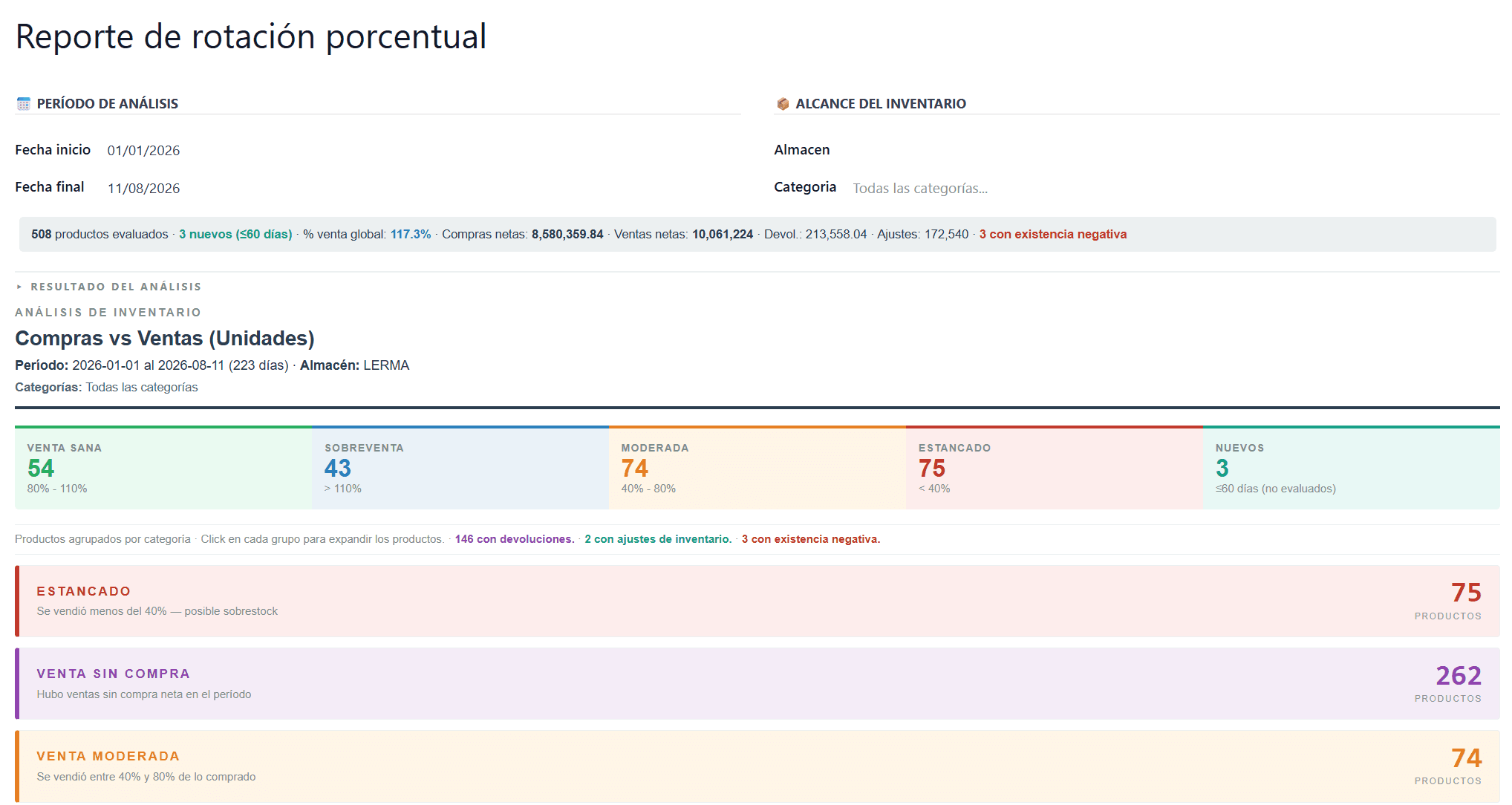
Every product lands in one of four classes —high if it turned over at least once, medium between 25% and 100%, low below 25%, no movement when there is stock but nothing went out— and the list is sorted with the alerts on top. Low and no-movement products come already expanded, showing the breakdown: opening, closing and average stock, purchases and outgoing for the period, and how many days the inventory lasts at the current pace.
A second report ships with it and asks a different question: purchases against sales in units, net of supplier returns, customer returns and inventory adjustments. There, on-hand is also expressed in cases when the product has a master packaging, products with less than 60 days since their first receipt are set aside in their own section —judging them would be unfair— and the rest are grouped by category.
What changes
"What isn't selling?" stops costing an Excel export and an afternoon of formulas. Pick the dates, press a button, and the dead stock is already at the top with the number that backs it.
What's included
- Computes turnover per product as outgoing quantity divided by average stock for the period
- Reads opening and closing stock as of the actual dates, not today's on-hand
- Classifies as high, medium, low or no movement, and puts the alerts at the top of the list
- Expands each product with its stock, purchases, outgoing and remaining days of inventory
- Filters by date range, warehouse and product categories, subcategories included
- Ships a second report of purchases against sales, net of returns and inventory adjustments
- Expresses on-hand in cases when the product has a master packaging defined
- Sets aside products with less than 60 days of history so they aren't flagged as dead stock
Requirements
- Inventory module active, with at least one warehouse and its internal locations configured
- Products marked as storable: services and non-tracked consumables are excluded
- Odoo 18: the product filter relies on the storable field introduced in that version
- To see on-hand in cases, a product packaging whose name contains the word master
You might also need
Fulfillment Restock Calculator
How many units to ship to the marketplace warehouse, with numbers
Inventory & warehouse
Fulfilment Appointments
So the appointment doesn't fall through over something already known
Inventory & warehouse
Containers
You know what each unit cost you before the ship docks
Inventory & warehouse